In brief
- See at a glance which boat can go out, which can't, and why.
- Policies, equipment and maintenance sit in one place.
- Due dates come to you, most urgent first, before the season starts.
- Boats with data to complete are flagged: you always know which ones are truly ready.
Policies, equipment and services, all together
Policies in emails, equipment in an Excel sheet, services in messages with the mechanic: at season start ALFA brings them together for you.
Instead of rebuilding the picture boat by boat, you open one screen and see where every boat stands. Due dates reach you early, while there is still time to plan.
What ALFA does for whoever gets the fleet ready for the season
It tells you which boat can go out, and why
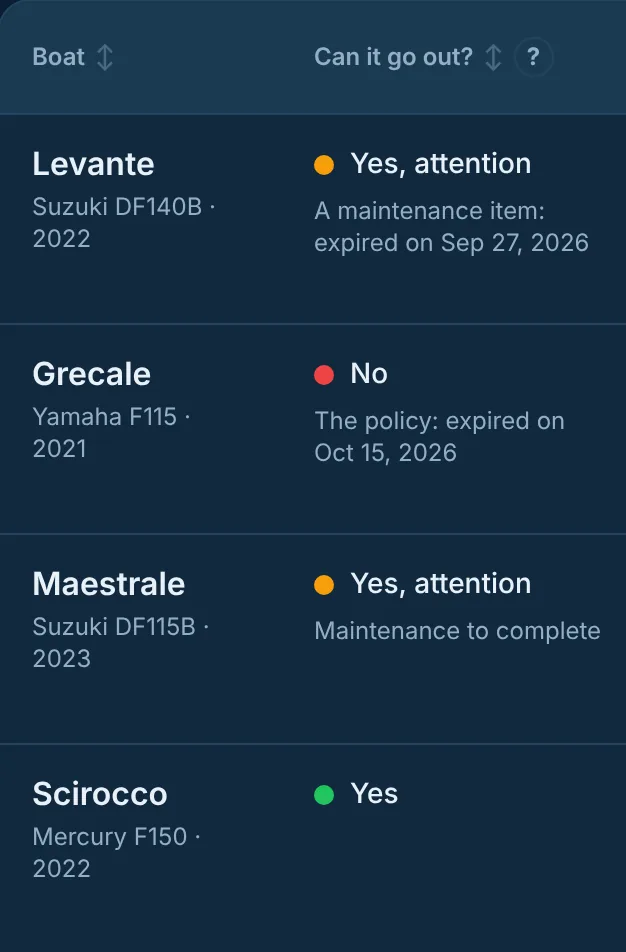
The “Can it go out?” column gives one answer per boat, and the most restrictive light always prevails:
- Red: a policy or an item of equipment has expired.
- Yellow: maintenance has expired or is to complete, or something expires soon.
- Green: all in order.
If a piece of data is missing, ALFA points it out: the boat shows as “Cannot be verified” until you complete it, so you always know which boats are truly ready.
It brings policies, equipment and maintenance into one place
The policy and the life raft date are always at hand. For each boat, ALFA keeps the due dates of policies, equipment and maintenance together, and calculates maintenance by engine hours and by date.
It tells you what to do, and in what order
The schedule brings together the deadlines of the whole fleet and sorts them by urgency. Reminders arrive before the deadline, with time to plan.
It brings in the mechanic's work, signed
The mechanic scans the boat's QR code and proposes the work from the app. You approve it, from the Plancia too, and the work enters the history with their signature.
How to get started
Start from your Excel file: download the template, fill it in and import it. Before writing anything, ALFA shows you what is ready and what needs fixing.
An example of a pre-season check
Example with demo data. One March morning you open the Plancia. Scirocco is green. Levante is yellow: its service has expired, so you call the mechanic. Grecale is red: its policy has expired, so you renew it before anything else. In a few minutes you know where to start.