In brief
- ALFA warns you of due dates before they arrive.
- The whole team works on the same fleet, with the same data.
- Every date to complete is flagged, boat by boat.
- Every job the mechanic does goes into the history with their signature.
- You start from the sheet you already have.
From a spreadsheet to a fleet maintenance schedule
Excel is the first tool at hand: one row per boat, one column per due date, a colour when something is close. For a few boats, it works.
As the fleet grows, equipment, policies and engine hours are added, and more people work on the same data: that is the moment for one maintenance schedule that works for you.
What ALFA does for a boat fleet manager
It warns you first, on its own
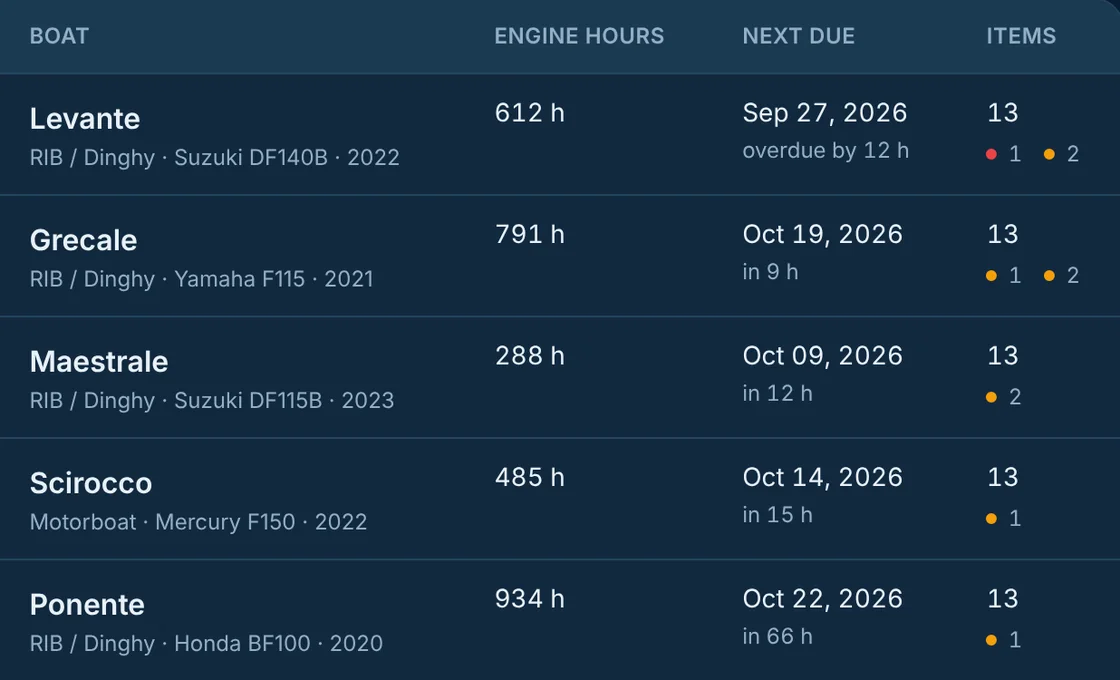
ALFA calculates every due date by engine hours and by date, even as the hours go up during the week, and puts it in front of you: the “Today” panel shows what is overdue or due soon across the whole fleet, and the email summary arrives when you choose. You know ahead what to prepare, before the customer reaches the dock.
It puts the whole team on the same fleet
You invite the people who work with you and decide what each can see and do; everyone looks at the same data at the same moment. The summary can also go to people without an account.
It always shows what is missing, boat by boat
ALFA flags every missing date as “to complete” and counts it in the summary: you always know which boats are in order and which are waiting for a piece of data.
It collects the mechanic's work, signed
The mechanic scans the boat's QR code and proposes the job from the app. You approve it, from the Plancia too, and the job goes into the history with their signature. Their work arrives already written down.
It starts from the sheet you already have
The work you did in Excel stays: ALFA starts from the sheet you already have, with your own column names.
How to move from Excel to ALFA
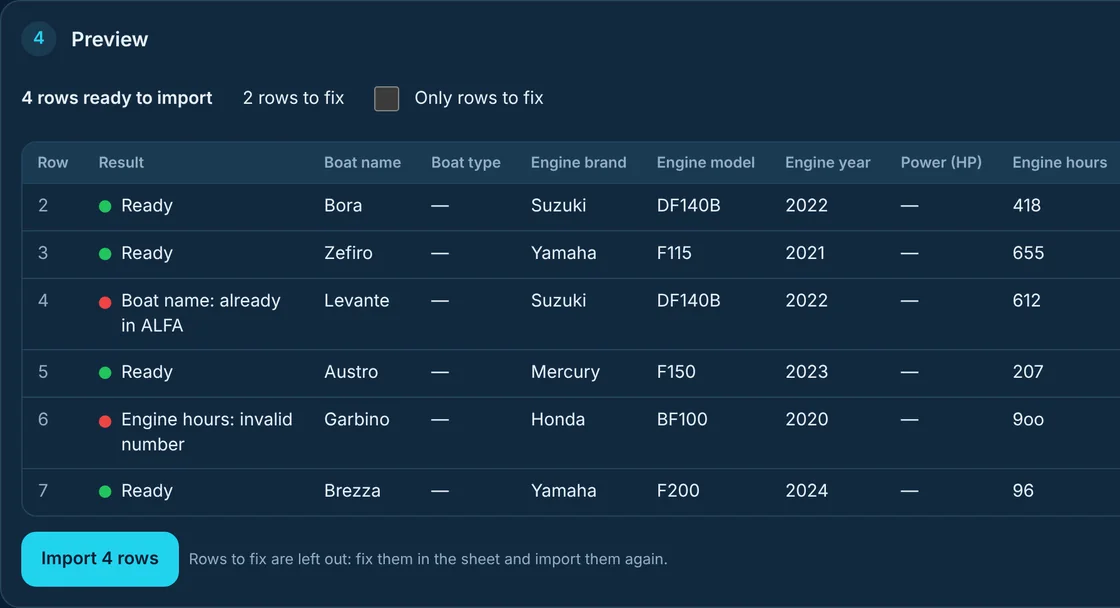
In the Plancia, open “Import from Excel”, choose whether you are importing boats, equipment or policies, and upload the file or paste the cells. ALFA recognises the columns and, before writing anything, shows you row by row what is ready and what needs fixing, with the reason. For boats, engine and hours are enough: maintenance items come from the engine catalogue.
An example of moving from Excel
Example with demo data. A rental fleet has a sheet with one row per boat: name, engine make and model, year, hours. It pastes it into the Plancia, and ALFA recognises the columns on its own. The preview shows four rows ready and two to fix: Levante is already in ALFA, and Garbino's hours have a letter instead of a zero. The fleet imports the four rows, fixes the sheet and imports Garbino again. Then it moves on to policies, the same way. From that day the schedule sorts the whole fleet by urgency, and the whole team works on the same data.