In brief
- You know what each boat earns, measured per hour underway.
- Costs, trips and revenue sit in one place, per boat.
- Mechanic jobs with a cost and insurance premiums go into costs without retyping them.
- The margin is worked out on complete data, and anything still to add shows right away.
- You compare the whole fleet row by row, per hour or per trip.
The cost per hour underway, boat by boat
At the end of the season you know what came in and what went out. With ALFA you also know what one hour underway cost for each boat.
Costs, hours underway and revenue come from different places: ALFA brings them together for you, boat by boat, during the season rather than after it.
With the right numbers, you choose which boats to back
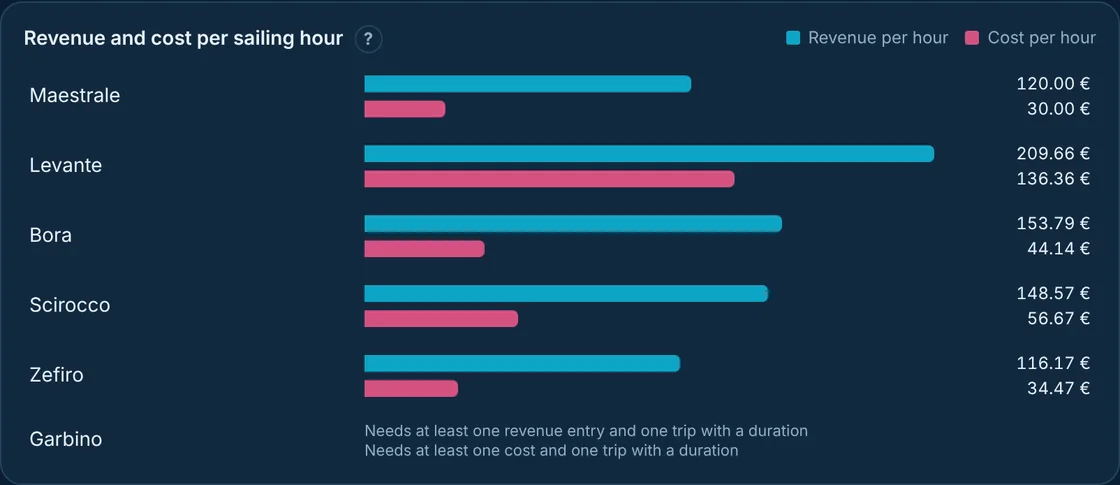
Two boats with similar revenue can earn very differently: if one is out half the hours and spends more time with the mechanic, each of its hours costs far more. With the cost per hour you see it straight away, and calmly decide which boats to renew, what rate to set and when it is time to sell.
And since costs and trips are logged as they happen, the numbers add up without rebuilding anything by hand.
What ALFA does for a charter fleet manager
It tells you which boat pays off, per hour underway
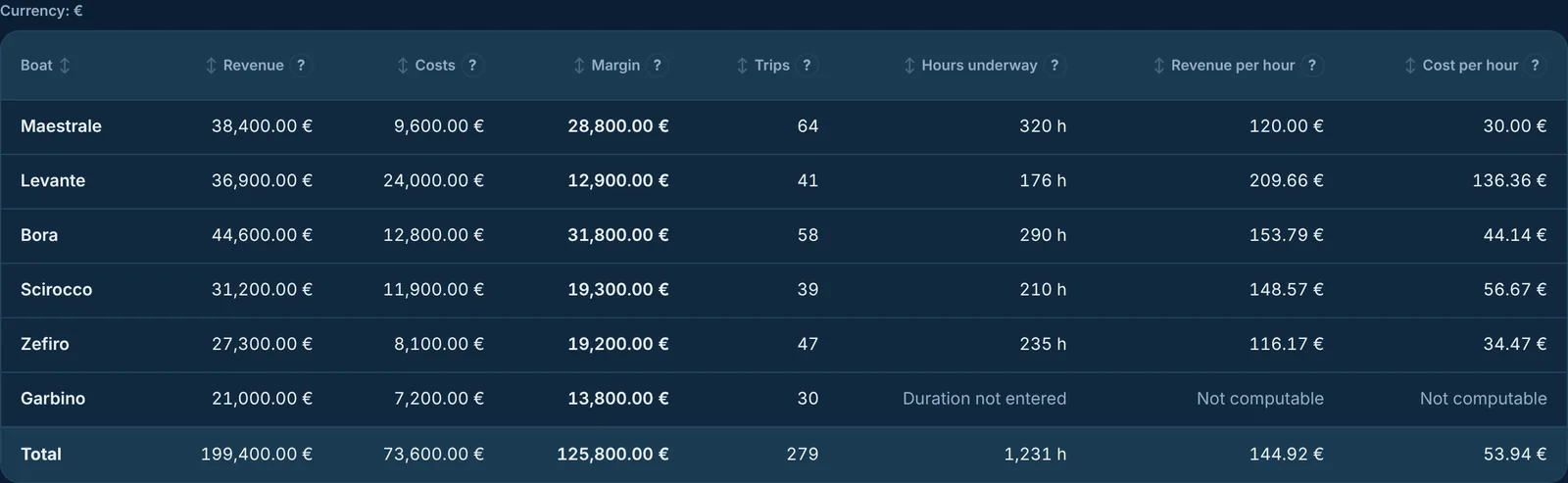
In the Plancia, the «Profitability» page shows revenue, costs, margin, hours underway and trips for each boat. With «Compare» you pick «Per hour» or «Per trip»: revenue and cost go on the same unit, side by side, and the gap between them is what the boat leaves you. Sort the fleet by any column and the boats to look at first rise to the top.
It puts costs, trips and revenue in the same place
Costs are logged from the Plancia or the app, by category: fuel, maintenance, storage, insurance. Trips with their duration, from the app on the dock or from the Plancia. Revenue, charters, courses or other, from the Plancia. Everything stays tied to the boat, and the sums do themselves.
It brings the mechanic's work and policies into costs
When you approve a mechanic's job that carries a cost, that cost goes into the boat's profitability. The same goes for the premium of a recorded insurance policy. The cost that matters for the boat is already there.
It shows the margin only when the data is complete
If in a period a boat has no costs or revenue logged, ALFA says so: «No costs», «No revenue», «Not computable» when trip duration is missing. None of these counts as zero, and the margin isn't worked out until the data is there. If a boat really sat idle without earning, you state it with «Declare 0», and from then on the numbers add up.
You decide who sees the numbers
Revenue and margins are seen by whoever you choose. For each person on the fleet you grant or remove the permission to see them: whoever logs trips on the dock can work without seeing the margins.
How to get started
Register the fleet and, for each boat, start logging costs, trips with their duration, and revenue. From the first month the «Profitability» page compares the boats with each other, and with the filters you choose period, boats and categories.
An example of comparing cost per hour underway
Example with demo data. A charter fleet has two similar motorboats, Maestrale and Levante, with almost equal revenue at season end. On the «Profitability» page, set to «Per hour», the bars tell another story: Levante was out fewer hours and had two more mechanic jobs, so each of its hours costs far more than Maestrale's and leaves less margin. For Garbino the page says «Not computable»: its trips have no duration. The fleet manager completes Garbino's trips and, with every boat's numbers in front of them, decides next season's rate and whether to keep Levante on real data.